Designing a layout file
A Perceptive Enterprise Search layout file is a standard HTML file with special markers to indicate where the source page's content should be injected. You can create a layout file in any HTML editor using any HTML methodologies you like including CSS, tables, absolute positioning, etc.
Once you are happy with your layout you will need to insert the content placeholders which indicate the location where the "source" page's content is to be embedded. Perceptive Enterprise Search allows creation of multiple named content areas. To indicate the main content area of the layout file insert the following into your HTML:
{Content} There can only be one main content area.
If you are creating multiple content areas the subsequent areas must be designated by name.
{Content name="ContentAreaName"}
The standard Perceptive Enterprise Search websites use two content areas: the "main content area" and
a named content area called "SidePanel". The side panel contains extra navigation
options such as search options, categories and entities.
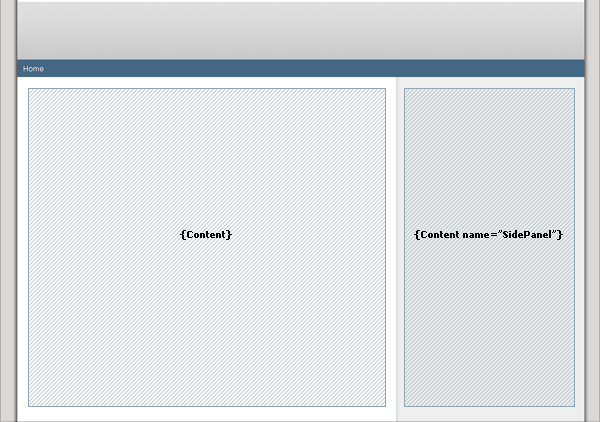
Perceptive Enterprise Search Symbols
A layout page has a limited number of Perceptive Enterprise Search symbols that are directly supported.
Theses are:
| {Content} | Merges the "main content area" from the source document into the master page. |
| {Content name="ContentAreaName"} | Merges the named content area from the source document; nothing is outputted if the content area does not exist. |
| {IfContent name="ContentAreaName"}...{EndIf} | The HTML between IfContent and EndIf will only be shown if the source page has content to be shown. |
| {IfNotContent name="ContentAreaName"}...{EndIf} | The HTML between IfContent and EndIf will only be shown if the source page has no content to show. |
| {Navigation} | Returns the bread crumb navigation for the source page. |
| {Title} | Returns the title of the source document as designated by the PageTitle directive. |
It is possible to use other Perceptive Enterprise Search symbols, however, please note that Perceptive Enterprise Search will only be able to expand the symbol if the source page supports it. For example, using the {Query} symbol only works when the source page is a "Result List" template, otherwise it will simply output the literal " {Query}".
Perceptive Enterprise Search provides you several site themes which are implemented as layout files. For examples check the Perceptive Enterprise Search\WebThemes\Site folder.